


Dust accumulation and trapped grime can gradually degrade the luminous output of modern diodes, causing rooms to appear dimmer over time while restricting proper heat dissipation. Everyday fixtures such as flush mount ceiling disks, task lamps, and accent light bars require routine attention to keep their diffusers clear and their internal electronic drivers running cool. Learning how to clean and care for a led lights helps protect sensitive circuit boards from moisture damage and prevents early component failure across all household fixtures. When setting up brighter living areas, exploring affordable LED lighting options can also show how sealed diffusers help repel airborne contaminants compared to open housing styles.
Unlike older incandescent bulbs that relied on high heat to produce illumination, solid-state lighting assemblies use delicate printed circuit boards that suffer when blanketed by thick dust layers. Harsh chemical cleaners and excessive water spray can easily penetrate unsealed seams, stripping optical coatings or shorting miniature low-voltage connections. Establishing a gentle, regular upkeep routine preserves beam clarity, extends operating lifespan, and maintains consistent color temperature across your entire lighting setup. Simple practices such as disconnecting power sources before wiping surfaces ensure safe handling without voiding manufacturer warranties or degrading fragile plastics.



Comprehensive Guide to Cleaning and Caring for LED Lighting Systems
To clean and care for LED lights safely, always turn off the electrical supply, allow the fixture to cool completely, and wipe exterior surfaces using a dry or slightly damp microfiber cloth without spraying moisture directly into housing vents or electrical ports. Harsh chemicals such as acetone, alcohol, and ammonia-based glass cleaners must be avoided because they degrade polycarbonate diffusers and strip protective coatings. Routine dry dusting prevents dirt from insulating heat sinks, which preserves the operational lifespan of the internal driver and maintains original lumen output. Proper care also includes inspecting power cords, checking ventilation clearances, and verifying that environmental moisture ratings match the installation location.
Immediate Safety Protocols: Power Disconnection and Thermal Cool-Down
Cutting electrical power stands as the foundational safety step before attempting any maintenance on solid-state lighting hardware. Hardwired fixtures should be switched off at the wall or circuit breaker, while plug-in and rechargeable accessories require physical detachment from USB cables or wall adapters. Even though light emitting diodes operate at significantly lower temperatures than legacy incandescent filaments, their internal drivers and compact heat sinks still accumulate noticeable thermal energy during extended runtimes. Giving a fixture at least ten to fifteen minutes to cool ensures that internal components stabilize and prevents thermal shock to acrylic diffusers when touched by cooler cleaning fabrics.
Handling powered fixtures introduces severe risks of accidental short circuits, particularly if moisture bridges exposed contact pins or enters unsealed housings. Modern fixtures often incorporate sensitive touch controls or dimming chips that can misfire or sustain electrostatic damage if handled while energized. Unplugging portable devices like rechargeable desk lamps or magnetic bars also prevents unexpected activation while wiping around light emitting surfaces. Taking this momentary precaution shields both the user from electrical hazard and the delicate solid-state circuitry from sudden power surges.
Essential Cleaning Tools and Safe Cleaning Agents for Sensitive Diffusers
Selecting the correct maintenance materials prevents micro-scratches on optical lenses and keeps light distribution smooth and uniform. An ultra-soft, lint-free microfiber towel serves as the primary tool for lifting dry dust and ambient debris from plastic and glass diffusers. High-pressure air dusters or specialized compact blowers can dislodge stubborn particulate matter from tight crevices, heatsink fins, and recessed sockets without requiring physical contact. Coarse paper towels, abrasive sponges, and stiff utility brushes should never touch optical covers because they produce microscopic abrasions that cause uneven glare.
Chemical selection demands equal care because aggressive solvents can instantly haze transparent polymers or dissolve factory sealants. Pure lukewarm water lightly misted onto a microfiber cloth remains the safest cleaning medium for general surface smudges. If greasy residues appear on kitchen under-cabinet bars or garage fixtures, a single drop of mild dish soap diluted in water provides sufficient degreasing power without degrading the plastic. Never apply isopropyl alcohol, bleach, ammonia, or petroleum distillates directly to LED covers or driver housings. After wiping with a damp cloth, immediately dry the area with a separate clean towel to stop mineral spots from forming.
Step-by-Step Cleaning Process for Standard LED Fixtures and Enclosed Covers
A structured cleaning sequence ensures thorough dirt removal while minimizing the need to repeatedly scrub delicate surfaces. Begin by sweeping away loose surface dust using a dry microfiber cloth, moving in gentle unidirectional strokes from the top of the fixture downward. Next, inspect the optical lens or diffuser plate for stubborn debris, grease spots, or insect residue that dry wiping fails to lift. Lightly dampen one corner of a cloth with clean water, wring it out until virtually dry, and lightly rub the affected areas. Finish the procedure by running a dry microfiber edge across all surfaces to eliminate residual moisture film.
Cleaning around joints, fasteners, and power entry ports requires exceptional caution to avoid forcing liquid into internal cavities. Never spray water or mild cleaning solutions directly onto any lighting assembly, as gravity will pull fluid past seams and onto live electrical connections. For detailed structures or grooved heat-dissipating channels, use a clean, dry soft-bristled artist brush or a narrow nozzle attachment on a jet blower. Keeping air motion steady quickly clears recesses without stressing delicate solder joints or thin plastic clips. Allow the fixture to air-dry completely for several minutes before restoring power.
Specialized Maintenance for Flush Mount Ceiling Fixtures and Sealed Housings
Ceiling-mounted units often endure distinct challenges ranging from room vibration to trapped dust and insect infiltration around overhead edges. Some modern options, such as the Drewaay 16-inch flush mount ceiling light, feature a fully sealed design with a profile measuring only 0.67 inches in thickness to prevent dirt from penetrating the inside of the lampshade. When maintaining enclosed fixtures of this type, wiping the exterior perimeter removes cobwebs and settled dust without needing to disassemble the internal canopy. The zero-flicker optical diffuser can be wiped clean with a dry microfiber wand, preserving its full 2800-lumen output across its 28-watt array.
If your flush mount fixture requires removal to adjust color temperature sliders or clean the mounting plate, handle the twist-lock or screw mechanisms carefully. Disengaging the canopy allows you to inspect the ceiling wire nuts for discoloration or physical looseness that might indicate thermal stress. Ensure that no dust settles into the junction box while the fixture is detached from the ceiling plate. When reattaching the light body, make sure the seal sits flush against the ceiling surface to maintain dust-barrier performance and reduce future cleaning frequency. Those managing distinct spaces can contrast these installations with compact LED fixtures that fit tighter utility areas.
Caring for Articulated Desk Lamps, Monitor Bars, and Multi-Function Units
Task lights and workspace luminaires accumulate skin oils, pencil dust, and airborne debris due to regular physical adjustments. Multi-functional options like the HURRISE LED desk lamp incorporate additional utility components, such as a three-speed fan, digital clock display, and pen holders, which demand individualized care. The 180-degree swinging round head must be supported at the hinge while wiping to avoid placing mechanical stress on internal wiring runs. Keep fan intake vents free of lint using short bursts of compressed air, and wipe the digital calendar screen with a dry cloth to maintain crisp visibility.
Monitor-mounted task lights, including the Jiawu RGB LED monitor light bar with its 45-degree beam angle, require specific attention around their screen contact points. The soft silicone padding on the counterweight clip should be wiped periodically to eliminate oils that could cause slippage or mark monitor bezels. Because these units draw power directly through USB C connections, always disconnect the cable before wiping the optical bar or RGB ambient strips. Keeping the directional lens clean ensures that glare-free downward illumination reaches the desktop without scattering reflections across the monitor surface.
Preserving Delicate Miniature Accent Kits and Model Display Wiring
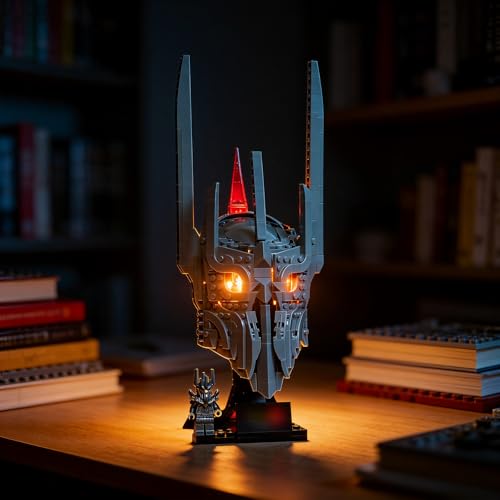
Miniature lighting installations designed for collector models require the most delicate cleaning approach of any LED category. Accessory kits from YEABRICKS, such as lighting sets designed for complex building models, utilize hand-soldered connections and ultra-thin hidden wires that cannot withstand aggressive pulling or wiping. Heavy microfiber cloths can easily snag on these micro-wires and pull tiny components away from structural studs. Instead of using standard wiping techniques, rely on gentle air velocity from a miniature jet blower or a soft camera lens brush to dislodge accumulated shelf dust.
Dual-power accessories connected via USB cables or discrete battery boxes must be thoroughly inspected for contact corrosion. Battery boxes stored inside enclosed display cases can suffer from battery terminal leakage if left unchecked over seasonal temperature swings. If a tiny LED diode becomes dim, check the connection pins rather than scrubbing the micro-lens, as friction can crack delicate solder joints. Keeping display cabinets clean and sealed reduces the necessity of touching these miniature builds, protecting hand-soldered museum-grade LEDs from accidental physical disruption. Collectors inspecting innovative illumination formats can also reference specialty LED fixtures to understand alternative housing constructions.
Managing Thermal Dissipation and Preventing Driver Overheating
Adequate heat dissipation directly dictates the service life and color stability of solid-state lighting arrays. Unlike incandescent sources that radiate heat forward as infrared energy, light emitting diodes produce conductive heat behind the chip that must escape through aluminum heat sinks. When a blanket of household dust settles across rear heatsink fins or fixture vents, it acts as a thermal insulator that traps heat around the driver board. Over time, elevated operating temperatures degrade the phosphors inside the diodes, leading to permanent color shifts toward unpleasant blue or yellow hues.
Routine maintenance should prioritize vacuuming or blowing away debris from heat-dissipating channels every three to six months. Ensure that flush mount ceiling units, under-cabinet bars, and recessed downlights have sufficient ambient airflow around their outer perimeters. Avoid packing insulation or decorative materials directly over fixture housings unless the hardware is explicitly certified for direct contact. Maintaining clear convective cooling paths keeps electronic capacitors cool, reduces thermal degradation, and helps your fixtures achieve their expected lifespan without early driver burnout.
Environmental Ratings and Moisture Exposure Considerations
Understanding the boundary between indoor dry-rated lighting and moisture-resistant hardware prevents hazardous cleaning errors. While consumer personal-care devices like ShinePick tooth polishers feature IPX6 water-resistant ratings permitting direct tap rinsing, standard indoor lighting fixtures possess no such water ingress protection. Attempting to wash under-cabinet light bars or magnetic task strips under running water will ruin electronic circuits instantly. Always confirm whether an enclosure carries a dry-location, damp-location, or wet-location label before using any liquid cleaner on its surface.
Magnetic portable units, like the ViaGasaFamido LED light bar with its beehive optical diffuser and 1200mAh rechargeable battery, demonstrate the importance of physical enclosure care. These fixtures rely on clean magnetic mounting surfaces to prevent slips and falls that could crack internal battery cells or fracture plastic lenses. Wipe the magnetic base and adhesive mounting plate regularly to ensure firm physical contact free of grit or kitchen grease. Respecting moisture limitations preserves internal charging ports and keeps lithium-ion cells safe from electrolytic corrosion.
Long-Term Storage and Preventive Care Practices for Portable LED Hardware
Portable and rechargeable lighting hardware demands specific preventive maintenance during periods of non-use. Storing battery-powered light bars, emergency work lights, or folding desk lamps with depleted cells can cause irreversible lithium-ion degradation. Charge rechargeable units to roughly fifty to eighty percent capacity before storing them in a cool, dry closet away from direct sunlight. High storage temperatures accelerate internal battery aging and can warp thin acrylic diffusers, while excessive humidity corrodes internal USB charging ports.
Performing a quick bi-annual functional check prevents surprises during sudden power interruptions or seasonal decorating projects. Power on stored fixtures, cycle through their brightness levels and color temperatures, and verify that touch sensors or push buttons operate smoothly without sticking. Inspect silicone gaskets and charging port dust covers to ensure they remain pliable rather than brittle. Simple proactive habits, combined with gentle surface cleaning, keep your solid-state lighting fixtures operating efficiently and looking brand-new for years to come.
Consistent care preserves both the aesthetic clarity and electrical reliability of modern solid-state lighting arrays. Taking time to wipe away dry dust, avoid liquid penetration, and protect cooling pathways ensures maximum light output without premature component wear. Always follow the manufacturer instructions specific to your fixture model, verify environmental ratings before mounting lights in damp zones, and handle delicate wiring with light, patient care.




Write Your Review
No reviews yet. Be the first to share your experience!