


Harsh screen glare and unbalanced desktop shadows cause frequent eye fatigue during late-night productivity sessions. Traditional overhead fixtures flood entire rooms with flat, uncalibrated illumination, creating blinding reflections across glass computer displays. Integrating a dedicated desk lamp with monitor directly over your workstation resolves this issue by focusing light downward onto physical documents and keyboards without washing out digital pixels. Unlike a standard light purple table lamp that disperses light in all directions, modern screen bars and monitor-clearing task lights feature asymmetrical optical designs that shield your vision while boosting surface contrast.
Selecting the right desktop fixture requires a close look at lumen output, color rendering index (CRI), and flicker-free driver performance. Based on detailed manufacturer specifications and user feedback, top models deliver versatile color temperature controls from 2700K warm white to 6500K cool daylight. Clamping architect designs and counterweight screen bars preserve valuable desktop space, eliminating bulky weighted pedestals. Smart dimming sensors and mechanical switches give you instant control over localized lux levels, ensuring balanced brightness that protects your eyesight throughout long workdays.
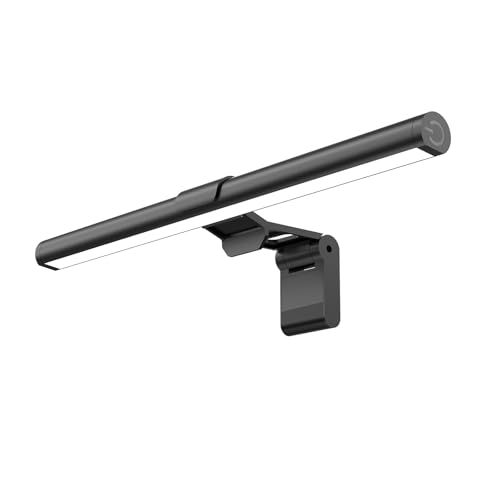
Pros
- Provides up to 800 lux of desk illumination without consuming valuable desktop real estate.
- Angled 45-degree beam directs light downward to minimize digital eye strain and monitor reflection.
- Features 3 distinct Kelvin settings (3000K, 4000K, 6500K) paired with stepless dimming and memory recall.
- Counterweight clip enables quick, tool-free mounting on both flat and curved displays.
- Convenient USB power source operates easily from a computer port, monitor hub, or power bank.
Cons
- The 11.8-inch bar length is compact and may provide narrower coverage on large ultrawide or dual-monitor setups.
- A dedicated USB wall plug adapter is not included in the package.
- Specific color rendering index (CRI) rating and total lumen figures are not listed by the manufacturer.
The Samphon 11.8-inch Monitor Light Bar is a space-saving USB task light engineered to clip directly onto a computer display, directing illumination straight onto your work area rather than your eyes. Traditional gooseneck desk lamps often consume scarce desktop surface and cast distracting reflections across computer displays. This compact light bar is designed specifically for remote professionals, students, apartment residents, and gamers seeking a clutter-free desk surface and glare-free task illumination.
In terms of lighting output, the manufacturer rates this 11.8-inch fixture to deliver up to 800 lux of central brightness across a 30 by 20-inch coverage zone. Its optical design uses an asymmetric 45-degree beam projection that targets the keyboard and desk area in front of the screen. Because the beam avoids washing directly over the display panel, it helps eliminate screen reflections that cause digital eye fatigue during extended computer sessions. While total lumens and CRI ratings are not provided, the focused output offers substantial utility for daily typing, document reading, and close-up workspace tasks.
Color control is flexible with three preset color temperatures: 3000K warm white, 4000K neutral white, and 6500K cool daylight. Users can switch to 6500K when high alertness and sharp contrast are required for data entry or daytime study, 4000K for everyday administrative tasks, or 3000K for evening gaming and casual browsing. Brightness is adjusted through stepless dimming, allowing users to fine-tune the intensity smoothly rather than relying on coarse preset steps. An integrated memory function also automatically restores your previous brightness and color setting the next time the light powers on.
The physical fixture measures 11.8 by 0.78 by 3.3 inches and features a clean black finish. Mounting is straightforward thanks to a patented counterweight clip system that rests securely on top of the monitor frame without adhesives, screws, or tools. According to the manufacturer, the clip accommodates a wide range of display profiles, including thin bezels, thicker monitor backs, and curved screens. Power is delivered via a standard USB connection, meaning you can run the light directly from a desktop PC, a monitor USB pass-through port, a power bank, or a standard 5V wall adapter.
Potential buyers should consider a few practical factors before purchasing. At 11.8 inches wide, this fixture is smaller than standard 16-to-18-inch light bars, making it best matched with laptops, smaller monitors, or compact workstation desks rather than expansive 34-inch ultrawide panels. Additionally, all adjustments rely on a single mechanical switch located on the right edge of the light bar, which requires reaching up to the monitor instead of using a desktop dial or wireless remote. A USB power brick is also not included, so you will need an open USB port or a spare phone charger adapter.
For shoppers seeking an inexpensive, clutter-free task lighting upgrade, the Samphon 11.8-Inch Monitor Light Bar provides dependable everyday value. Its combination of 800 lux central desk illumination, 45-degree anti-glare optics, three color temperatures, and tool-free counterweight installation makes it a smart choice for dorms, home offices, and compact computer workstations.
This monitor light bar features 3 dedicated color temperature modes: 3000K, 4000K, and 6500K. The 3000K setting emits a softer, warmer glow that is well-suited for late-night computing and relaxing sessions. The 4000K neutral setting offers a clean balance for general reading and writing, while the 6500K daylight mode provides crisp, cool task lighting suitable for focused daytime work and detailed tasks.
The light also supports stepless brightness dimming, operated directly via the right-side mechanical switch. A long press allows the light level to ramp smoothly up or down to match ambient room conditions. A built-in memory feature retains your chosen brightness and color mode, eliminating the need to re-adjust the light every time you turn it back on.
Installation requires no screws, clamps, or sticky adhesive tape. The light uses a patented counterweight mounting clip designed to balance atop your display bezel and remain firmly anchored using gravitational tension. This design keeps the entire desk surface clear for keyboards, mice, notepads, and other peripherals.
According to the product specifications, the mounting mechanism accommodates thin and thick monitor bezels, as well as curved and flat monitor screens. Because the unit measures 11.8 inches long, it balances easily across compact monitors and laptop screens without placing excessive strain on the display hinge or frame.
The Samphon screen light bar is powered through a standard USB interface, offering broad compatibility with desktop computers, powered USB hubs, external battery packs, and USB wall adapters. This low-voltage setup allows users to run the task lamp without dedicating a standard 120V wall socket to the fixture.
All controls are housed in a single mechanical switch on the right side of the bar. A short press cycles through power and the three color temperatures, while a sustained long press smoothly adjusts the brightness level. This all-in-one button setup keeps the profile simple while providing direct tactile control.

Pros
- Dual-head design and flexible gooseneck provide broad, customizable lighting angles across large desk surfaces
- Offers versatile personalization with five color temperatures (3000K-6500K) and five dimming stages (20%-100%)
- Includes both onboard controls and a wireless remote with an operating range up to 32.8 feet
- Sturdy edge clamp frees up valuable work surface area compared to conventional bulky lamp bases
Cons
- Clamp-only mounting requires a desk with an exposed lip and cannot stand freely on a flat surface
- Manufacturer does not list specific lumen output, electrical wattage, or color rendering index (CRI) ratings
- Does not include smart home connectivity, Wi-Fi, or companion app controls
The Motumen LED Desk Lamp is an integrated clamp-on task light built specifically for home office setups, student study tables, crafting benches, and multi-monitor workstations. Featuring a dual-head light bar and an adjustable gooseneck, this fixture suits anyone seeking to clear desktop clutter while spreading illumination over a broad working area. Its edge-clamp design attaches securely to tables, leaving desk pads, keyboards, and paperwork completely unobstructed.
Lighting customization is a major strength of this unit, offering five distinct color temperatures between 3000K (warm white) and 6500K (daylight cool white). In addition to color tuning, the lamp provides five step-dimming levels ranging from 20% to 100% brightness. Equipped with 168 LED beads across its dual heads, the fixture distributes light evenly to reduce harsh glare, harsh shadows, and visual fatigue during long reading or working sessions. A built-in memory function automatically retains the last-used brightness and color configuration so you do not have to reset your preferences each time it is powered on.
Weighing 1.65 pounds with dimensions of 22 by 4.5 by 29.5 inches, the lamp features a practical black finish that integrates cleanly into modern workstations. The flexible gooseneck arm allows each light head to be positioned independently for targeted task coverage. For operation, the unit provides two convenient control options: onboard push buttons on the lamp itself for immediate physical adjustments, and a handheld remote control capable of operating from up to 32.8 feet (10 meters) away. The lamp also includes an integrated 1-hour timer that automatically turns off the light, which is useful for focused study blocks or bedtime reading.
Physical setup is quick and straightforward thanks to the edge-clamp mounting system, requiring no permanent drilling or specialized tools. Users simply secure the clamp onto a sturdy desk edge, connect the power cord, and flex the neck to suit their monitor layout or writing position. Maintenance is minimal, requiring only an occasional wipe with a soft, dry cloth to keep dust off the LED diffusers. Because the lamp uses direct push-button and remote-control hardware, there is no need for mobile apps, network pairing, or smart home hub configuration.
While practical for everyday workspace tasks, this fixture has several limitations to consider before purchasing. The clamp mount requires a desk or tabletop with an accessible lip, meaning it cannot be positioned on desks with fully enclosed backing panels or used as a standalone base lamp. Furthermore, specific specifications such as lumen output, wattage consumption, and Color Rendering Index (CRI) are not officially provided by the manufacturer, which may be a drawback for buyers who require precise technical lighting ratings. It also lacks Wi-Fi, Bluetooth, or voice-assistant compatibility.
For remote professionals, students, and hobbyists seeking an affordable, space-efficient lighting solution, the Motumen dual-head desk lamp offers reliable utility. Its combination of tunable white light, multi-level dimming, dual control methods, and a flexible gooseneck makes it a sensible and convenient task-lighting addition to standard home workstations.
This desk lamp features five color temperature settings ranging from warm 3000K to crisp 6500K daylight. The 3000K setting produces a warm, softer tone suited for evening reading or relaxed tasks, while the higher 6500K setting provides clear, cool illumination ideal for detailed drafting, study sessions, and intensive office work.
Brightness can be tailored through five distinct levels spanning from 20% to 100%. The internal memory retains your selected brightness and color mode between power cycles, while the 1-hour auto-shutoff timer helps manage study intervals or prevent the light from being left on unintentionally.
The Motumen lamp utilizes a clamp mounting system that fastens directly to the edge of a desk, drafting table, or workbench. By eliminating a heavy desktop base, this clamp design preserves valuable work surface for monitors, peripherals, and paper documents.
Users can manage lighting settings using either the push buttons located directly on the lamp or the included wireless remote control, which operates at distances up to 32.8 feet. Combined with a multi-directional flexible gooseneck, the 168 LED beads can be quickly aimed across dual monitors, open notebooks, or detailed craft projects.

Pros
- Ultra-high Ra98 CRI ensures realistic color rendition for design tasks and reading
- Asymmetrical light path illuminates the desk while keeping the monitor screen free of reflections
- Automatic ambient light sensing adjusts illumination to a balanced 900 lux target without manual effort
- Top-mounting weighted clip frees up valuable desk space compared to traditional desk lamps
Cons
- Requires a continuous USB power source, such as a computer port or dedicated USB wall adapter
- Weighted clip mounting design may require adjustment or lack compatibility with very thick or deeply curved monitors
- Operates exclusively via manual touch controls without Wi-Fi, app, or smart-home voice assistant support
The Quntis 40cm Computer Monitor Light Bar is a specialized USB-powered LED task lamp designed to mount directly on top of computer displays, making it a great match for home office professionals, students, and gamers seeking efficient desktop illumination. Rather than occupying valuable desk real estate like a standard gooseneck or base-mounted desk lamp, this fixture uses a weighted mounting clip that balances securely atop the screen. Measuring approximately 16.14 inches in length and weighing 1.1 pounds, it provides an organized, low-profile lighting solution for modern workstations.
Equipped with 78 LED beads, the light bar delivers tailored task illumination across a tunable color temperature spectrum of 3000K to 6500K. A standout specification is its ultra-high color rendering index of Ra98, which presents true-to-life colors and helps minimize visual fatigue during color-critical workflows, photo editing, or document reading. The fixture incorporates an asymmetrical optical design that angles the light downward toward the keyboard and desk surface rather than bouncing light off the monitor glass. Additionally, an integrated ambient light sensor monitors surrounding brightness to automatically adjust illumination toward a 900 lux target, while manual stepless dimming allows personalized fine-tuning.
Built with a sleek gray housing and responsive touch controls, the light bar balances clean aesthetic appeal with functional durability. For visual comfort, the fixture complies with IEC/TR 62778 and IEC/EN 62471 eye safety standards to limit blue light hazards and provide flicker-free operation. The weighted clip mechanism holds the lamp in place through counterbalancing, avoiding the need for sticky adhesives, screws, or invasive clamps that could damage delicate monitor bezels.
Operating the unit is straightforward, as it draws power via a standard USB connection connected to a computer port, powered hub, or standard USB power adapter. The on-board touch controls let users easily switch between auto-dimming mode and manual adjustments for both brightness levels and color warmth. Because it mounts above the screen, cable routing runs directly down the rear of the monitor, keeping wires out of sight and maintaining an uncluttered workspace.
While the space-saving mount works well for standard flat-panel displays, buyers should note potential physical limitations. The weighted clip is engineered around standard monitor profiles and might require careful balancing or prove incompatible with ultra-thick monitor chassis designs or unusual rear enclosures. Furthermore, the unit relies strictly on physical touch controls without companion smartphone apps, Wi-Fi connectivity, or smart home voice integrations, making it a dedicated manual task fixture rather than a networked smart lighting device.
For desk users who want to eliminate screen glare, recover desk space, and enjoy natural color rendering without complex smart setups, the Quntis monitor light bar offers a dependable and practical lighting upgrade. Its Ra98 color accuracy, automatic ambient light sensing, and certified flicker-free output make it a solid addition to home offices and study environments.
The Quntis monitor light bar features an ultra-high color rendering index of Ra98, which closely mirrors natural light and ensures colors appear vibrant and accurate on your desk surface. This high level of color fidelity is especially beneficial for creative professionals, graphic designers, and anyone working with color-critical physical documents.
In addition to color accuracy, the fixture offers a tunable white range from 3000K to 6500K. Users can set a warm 3000K light for relaxed evening reading or shift to a neutral or cool 6500K tone for focused daytime productivity, adjusting the ambiance easily through the built-in touch controls.
The built-in ambient light sensor continuously monitors your room lighting conditions and automatically adjusts the light output to maintain an optimal 900 lux workstation level. This automated compensation helps prevent visual fatigue caused by working in spaces that are either excessively dim or overly bright.
The lamp uses an asymmetrical optical design that focuses light solely forward and down onto your desk area. By directing the light path away from the display panel, the light bar completely avoids screen reflections and glare, providing comfortable task lighting without interfering with monitor visibility.
Designed with a 40cm (approximately 16.14 inch) profile, this task light mounts directly to the top edge of your monitor using a weighted counter-clip. This design frees up the desk surface typically consumed by conventional lamp bases and swing arms.
The weighted mount rests securely against the monitor bezel and back casing without needing adhesives or mechanical clamps. This makes it an adaptable choice for dorm desks, shared work areas, and minimalist home-office setups where desktop workspace is at a premium.


Pros
- Versatile optical tuning with 3 color temperatures (2700K, 4500K, 6500K) and 10 distinct brightness levels.
- Space-saving clamp mount and 360-degree gooseneck provide flexible light positioning without cluttering desktop space.
- Includes a compatible 5V/2A USB power adapter right in the box.
- Built-in memory function saves previous brightness and color mode preferences across power cycles.
- Aluminum light board enhances passive heat dissipation to support a rated life of up to 50,000 hours.
Cons
- Does not provide smart-home connectivity, wireless app control, or automated scheduling.
- Manufacturer does not state specific lumen output or CRI ratings in the product specifications.
- Clamp mounting design requires a sturdy desk edge or shelf overhang and cannot stand independently on flat surfaces.
The Voncerus LED Desk Lamp with Clamp is a specialized task lighting fixture designed for home offices, dorm rooms, study areas, and hobby workbenches. Featuring an edge-mounting clamp and a slender gooseneck profile, this light is engineered for users who need focused illumination without sacrificing valuable desktop surface area. It suits students, remote professionals, and crafters seeking adaptable lighting for daily reading, writing, and computer tasks.
In terms of lighting versatility, the lamp features three distinct color temperature modes: a 2700K warm tone, a 4500K warm white blend, and a 6500K cool daylight option. Users can transition between these modes alongside 10 stepwise brightness levels to match daytime concentration demands or nighttime reading comfort. The fixture utilizes an ultra-thin light bar with integrated LEDs designed to produce uniform, soft light distribution while mitigating glare, ghosting, and visible flicker.
The physical construction pairs a 360-degree flexible gooseneck with an aluminum light board housing. The aluminum substrate assists with continuous thermal dissipation, which helps protect the internal LED components and supports a rated service life of up to 50,000 hours. Power delivery is handled through a standard USB interface, and the unit comes packaged with a dedicated 5V/2A power adapter, ensuring reliable electrical delivery without relying solely on laptop USB ports.
Setting up the Voncerus lamp requires minimal effort because the unit arrives pre-assembled and ready to clamp onto a desk rim or shelf ledge. The inline controller allows users to toggle power, switch between the three Kelvin presets, and cycle through the 10 brightness settings. An integrated memory function automatically preserves your preferred light configuration when the fixture is turned off, preventing repetitive adjustments every time you sit down to work.
While versatile for personal workstations, this lamp has a few operational limitations to keep in mind. It is strictly a direct-wire USB task light lacking Wi-Fi, Bluetooth, or smart ecosystem integration for voice control or automation. Additionally, because it relies on a clamp-on mechanism, it cannot stand upright on open desks without a suitable edge lip. Specific lumen ratings and Color Rendering Index (CRI) values are also omitted from manufacturer data, meaning buyers requiring certified color-critical rendering should weigh that factor.
Overall, the Voncerus LED Desk Lamp delivers a practical, budget-friendly task lighting solution for edge-mountable workstations. With its adjustable 2700K to 6500K spectrum, intuitive 10-step dimming, included 5V/2A adapter, and compact clamp footprint, it represents a dependable choice for anyone needing flexible, space-saving desk illumination.
This desk lamp supports tunable white adjustment across three designated color temperatures: 2700K warm light, 4500K warm white, and 6500K cool daylight. This range allows users to select softer, warmer tones for evening leisure or cooler illumination for daytime work and detailed study.
Brightness control is managed through 10 incremental dimming levels accessible on the controller. The built-in memory feature remembers the selected Kelvin mode and brightness setting, reactivating those exact preferences the next time the lamp is powered on.
The lamp attaches via an integrated mechanical clamp designed to grip the edges of desks, tables, headboards, or craft benches. This mounting method frees up desktop space compared to traditional weighted-base desk lamps.
Directional adjustment is facilitated by a 360-degree flexible gooseneck arm, which bends smoothly to angle light over specific work areas, monitors, or keyboards without loosening the base clamp.
Operating on low-voltage DC power, the lamp terminates in a standard USB connector for wide-ranging plug-in options. It can be powered directly from compatible USB ports or wall outlets.
A dedicated 5V/2A power adapter is supplied with the lamp, ensuring the LED board receives steady and sufficient current for full brightness and stable operation without requiring secondary power purchases.

Pros
- Asymmetric optics focus light forward onto the workspace rather than washing out the computer monitor screen
- Wide 3000K to 6500K color temperature range adapts smoothly between daytime productivity and late-night study sessions
- Tool-free counterweight mount fits securely onto flat or curved monitors without taking up desk surface area
- Simple side mechanical switch provides direct control over power, color temperature, and stepless dimming without needing an app or remote
Cons
- Requires an external USB power port or dedicated USB wall adapter since a power brick is not integrated
- Relies entirely on manual on-fixture switch controls with no wireless remote, mobile app, or smart-home compatibility
- The 15.7-inch bar length may offer narrower side coverage when paired with extra-large monitors over 34 inches wide
The SAMPHON 15.7-inch Monitor Light Bar is a dedicated USB-powered LED task fixture designed for home office professionals, remote workers, students, and gamers who need clear desktop illumination without sacrificing surface space. By clamping directly to the top bezel of a computer screen, this screen bar replaces traditional gooseneck or swing-arm desk lamps. It is especially well-suited for compact desks, dorm rooms, and multi-monitor setups where base space is limited and screen reflections from ambient room lighting cause visual fatigue.
Lighting performance centers on an asymmetric optical system engineered to direct light downward at a 45-degree angle. Rather than spraying light in all directions, the fixture projects its beam exclusively across the desk and keyboard area, preventing direct glare from hitting your eyes or bouncing off the monitor glass. The manufacturer specifies a central brightness rating of 900 lux over a 35-inch by 25-inch surface area, which helps eliminate dark corners and uneven shadows across your primary work surface. The light bar housing can also be rotated manually within its mount to adjust the target angle to match your monitor tilt and eye level.
For visual comfort across different times of day, the light bar offers 3 selectable color temperatures spanning 3000K warm light, neutral tones, and 6500K cool daylight. Users can switch to a cooler 6500K white for daytime reading and focused spreadsheet work, or transition down to a warmer 3000K setting during evening hours to reduce blue light exposure. Brightness is adjusted smoothly via stepless dimming, allowing you to find the exact light level that complements your room lighting. An integrated memory chip retains your previous brightness and color setting, meaning you do not have to reconfigure the light each time you power it on.
Physical setup and daily operation are designed for straightforward convenience. The fixture measures 15.75 by 0.78 by 3.3 inches and utilizes a patented counterweight mounting clip that rests stably against the back of the monitor housing without requiring tools, screws, or adhesives. It accommodates both flat and curved display profiles across varying bezel thicknesses. Control is handled via an intuitive mechanical switch on the right edge of the bar, where a short press toggles power or cycles through color temperatures, and a long press smoothly raises or lowers brightness. Power is delivered through a standard USB cable compatible with desktop PC ports, powered USB hubs, or external USB power bricks.
There are practical factors to evaluate before purchasing. The SAMPHON screen bar does not feature smart connectivity, Bluetooth, Wi-Fi, or an external wireless desktop puck, so all adjustments must be made directly on the unit. Furthermore, while the 15.7-inch length offers balanced coverage for standard 24-inch to 32-inch monitors, users with extra-wide displays over 34 inches may find that the illumination focuses primarily on the central work zone. A reliable 5V USB power supply is also required close to the setup to power the lamp.
For buyers looking for an affordable, space-saving task lighting upgrade that combats eye strain during long hours at the computer, the SAMPHON Monitor Light Bar is a sensible, practical investment. Its combination of glare-reducing asymmetric optics, stepless brightness adjustment, and flexible 3000K-6500K color temperatures provides reliable, ergonomic desktop lighting without cluttering your workspace.
The SAMPHON Monitor Light Bar features a patented 45-degree asymmetric optical design tailored specifically for desktop computer tasks. Unlike traditional desk lamps that throw light omnidirectionally, this optical layout casts light downward and forward across the desk and keyboard area, keeping direct light completely away from the monitor screen and out of your line of sight.
The unit delivers up to 900 lux of central brightness across an illuminated area measuring 35 inches wide by 25 inches deep. This wide beam spread helps eliminate harsh contrast between bright computer screens and dark peripheral desk surfaces, supporting comfortable viewing during late-night work sessions. The light bar can also be twisted within its clip holder to adjust the beam angle to match your screen height and desk position.
This monitor light bar provides 3 color temperature options covering a range from 3000K to 6500K. The 3000K warm setting provides a soft, relaxing ambiance suitable for evening entertainment or casual reading, while the 6500K cool daylight setting delivers high-contrast light suited for detailed writing, coding, and daytime work.
Brightness control is handled through stepless dimming rather than stepped presets, letting you adjust the light output smoothly by holding down the side-mounted mechanical button. An onboard memory function automatically stores your preferred brightness level and color temperature, so the light bar restores your custom profile the moment it turns back on.
Installation is completely tool-free thanks to the patented gravity counterweight clip mechanism. The weighted clip rests securely along the upper back of your display housing, keeping the 15.75-inch light bar firmly in place on both flat and curved monitors without obstructing the active display panel or requiring permanent adhesives.
The lamp is powered via a standard USB connection that connects directly to a computer USB port, a docking station, a power bank, or a standard USB wall charger. By resting entirely on top of the monitor frame and drawing power from existing desk equipment, the fixture keeps work surfaces clean and free of bulky lamp bases.

Pros
- Expansive 31.5-inch dual-head span provides even illumination across dual monitors or expansive drafting tables without screen reflections
- Versatile light customization with 5 color temperatures ranging from 3000K to 6000K and 10 brightness levels for day or night tasks
- Robust metal clamp saves valuable desktop space and accommodates surfaces up to 2.9 inches thick
- Integrated memory recall and selectable auto-off timers (10 and 45 minutes) simplify daily office operation
Cons
- Requires an open desk edge for clamp attachment and does not include an optional freestanding weighted base
- Manufacturer does not specify exact lumen output or electrical wattage ratings
- Lacks wireless app integration, remote control, or smart home ecosystem compatibility
The ShineTech LED Desk Lamp is an architect-style, clamp-on task light engineered specifically for multi-monitor computer setups, drafting tables, and wide home office workstations. Designed with an expandable dual-head bar that spans 31.5 inches, this fixture provides wide, balanced surface illumination without occupying valuable desktop surface area. It directly targets remote professionals, gamers, students, and hobbyists who need expansive, shadow-free overhead lighting that rises above their computer screens.
In terms of lighting performance, the lamp offers 50 distinct lighting modes created by pairing 5 selectable color temperatures with 10 stepped brightness levels. The color temperature spectrum spans from a warm 3000K white for relaxed evening work up to an invigorating 6000K cool daylight white for detailed drafting and reading. The manufacturer highlights flicker-free operation to help minimize eye strain during long hours of screen work. While exact lumen output and wattage ratings are not published, the light distribution is tailored to spread evenly across desktops up to 71 inches in width.
Build quality centers on functional adjustability and space efficiency. The fixture features a durable metal clamp fitted with a protective EVA foam pad that prevents marring or scratching on desk surfaces up to 2.9 inches thick. A flexible 360-degree gooseneck spine connects the clamp to dual 180-degree pivoting light bars, allowing you to angle the light bars outward for wide dual-display setups or fold them parallel for intense, focused task lighting. The internal LEDs are rated for up to 50,000 hours of operational life, providing years of reliable daily illumination.
Day-to-day operation is streamlined through responsive touch controls mounted directly on the fixture. An integrated memory chip retains your previous brightness and color temperature settings, eliminating the need to re-adjust your preferences every time the lamp powers on. It also incorporates a convenient timer button offering 10-minute and 45-minute auto-off intervals, which works well for energy management or nighttime reading routines. Assembly is straightforward, requiring you to attach the clamp to the gooseneck and secure it to the edge of your desk.
Before purchasing, buyers should account for a few practical limitations. Because this model relies exclusively on a clamp-on mechanism, it cannot be used on desks with closed backboards, solid privacy panels, or rounded bevel edges that prevent the clamp from gripping securely. Additionally, the unit does not support wireless app connectivity, smart home ecosystems, or handheld remote controls, meaning all adjustments must be made directly via the on-board touch interface.
For buyers seeking an affordable, space-saving task light that comfortably clears dual computer monitors, the ShineTech LED Desk Lamp is a dependable option. Its wide 31.5-inch spread, broad 3000K to 6000K temperature range, and sturdy metal clamp make it an effective lighting upgrade for modern home offices and study spaces.
The ShineTech desk lamp features 5 preset color temperatures ranging from 3000K to 6000K. The lower 3000K setting emits a soft, warm white tone suitable for evening reading and reducing blue-light exposure before bed. Intermediate settings provide neutral white light ideal for standard computer tasks, while the 6000K daylight white setting delivers crisp, cool illumination for detailed drawing, crafting, and focused paperwork.
Each color temperature setting can be paired with 10 brightness steps, totaling 50 custom lighting combinations. Adjustments are made through touch-sensitive controls that allow users to ramp intensity up or down depending on ambient daylight conditions. The built-in memory function retains the selected mode, ensuring consistent lighting each time the fixture is switched on.
Mounting this architect lamp requires a flat, sturdy desk edge capable of accommodating its heavy-duty metal clamp. The clamp mechanism supports desktop thicknesses up to 2.9 inches, making it compatible with thick butcher-block desktops, standing desks, and standard office furniture. An EVA foam pad lines the clamp interface to prevent surface dents and scratches.
With a 26.7-inch vertical clearance, the lamp easily extends over standard monitor risers, ultrawide panels, and dual-display configurations. The 31.5-inch horizontal light span distributes light evenly to the left and right sides of your workspace, effectively eliminating harsh shadows across desks measuring up to 71 inches wide.


Pros
- Asymmetric light path illuminates your desk surface without washing out the computer display.
- Three practical color temperature options (2700K, 4000K, and 6500K) cover relaxing, reading, and focused working modes.
- Top-mount counterweight clamp eliminates desktop clutter and requires zero tools for installation.
- Integrated memory feature preserves preferred illumination settings between work sessions.
- Flexible clamp design accommodates a wide variety of monitors measuring between 0.12 inches and 2.2 inches thick.
Cons
- Listed 250-lumen output is intended strictly for localized desk task lighting rather than ambient room illumination.
- Dimming and color switching are step-based across three levels rather than continuous stepless adjustment.
- Requires an accessible USB port or a separate USB wall power block to operate.
The Colorpanda 16.14-inch monitor light bar is a specialized USB-powered LED desk fixture engineered specifically for desktop computer users, home-office professionals, students, and gamers. Instead of occupying valuable desktop territory like a standard gooseneck or articulated desk lamp, this fixture mounts directly along the top bezel of your computer display. It is tailored for individuals seeking focused task illumination over their keyboard and workspace without introducing reflections on their screen.
Lighting performance centers on an asymmetric optical layout that channels light downward and slightly forward across the desk rather than scattering it across the monitor panel. The lamp produces a listed light output of 250 lumens, delivering moderate, glare-free task light directly where hands, notes, and peripherals rest. Users can toggle between three specific color temperature modes: 2700K warm white for evening work or winding down, 4000K neutral white for reading and general tasks, and 6500K cool daylight for high-focus daytime typing. Brightness can be adjusted across three preset levels using integrated touch controls, and an automatic memory feature preserves your selected brightness and color mode when turning the unit back on.
Build quality highlights a premium metallic finish housing with sleek dimensions measuring 0.9 inches deep, 16.14 inches wide, and 0.9 inches high. The mounting system relies on a patented counterweight clip mechanism that holds the light in position without screws, glue, or permanent brackets. The clip accommodates monitor thicknesses between 0.12 inches and 2.2 inches (0.3 cm to 5 cm), allowing it to rest reliably on flat panel displays, thin modern bezels, and slightly thicker conventional desktop computer monitors.
Setting up the fixture requires no technical expertise: simply rest the front lip of the lamp against the top edge of your monitor frame, let the counterweight hinge secure itself against the rear panel, and plug the integrated cable into a standard powered USB port or external USB adapter. The top-mounted touch buttons allow quick adjustments without needing mobile applications, remote controls, or wireless pairing. Routine care involves nothing more than an occasional dusting with a clean, dry microfiber cloth to keep the optical lens free from debris.
There are practical limitations to keep in mind before purchasing. With a manufacturer specification of 250 lumens, this fixture serves strictly as near-field task lighting and will not brighten an entire dark room on its own. Furthermore, brightness adjustments and color-temperature switching are restricted to three set stages rather than smooth, stepless ramping. Screens exceeding 2.2 inches in thickness or displays with pronounced rear curves may also present fitment challenges for the standard counterweight clamp.
For computer users looking to reduce eye strain, minimize screen glare, and keep their desk surface clear of lamp bases, the Colorpanda 16.14-inch monitor light bar offers a sensible and dependable lighting upgrade. Its targeted 250-lumen output, 2700K to 6500K spectrum selection, and straightforward USB power make it a practical productivity addition to any home workstation or gaming desk.
The Colorpanda light bar provides three distinct color temperature settings to support different tasks throughout the day. The 2700K warm white setting produces a softer glow suited for late-night computer use, reading, or relaxed browsing. The 4000K neutral white setting provides balanced, natural illumination for routine office work, while the 6500K cool daylight setting delivers crisp, alert lighting ideal for high-focus productivity and daytime tasks.
Brightness control is managed through onboard touch buttons that cycle across three distinct brightness levels. An integrated memory circuit automatically saves your chosen brightness level and color temperature, ensuring the light returns to your preferred settings the next time it is powered on without requiring manual readjustment.
Physical mounting is achieved through a counterweight clamp engineered to fit monitor bezels and casings ranging from 0.12 inches to 2.2 inches (0.3 cm to 5 cm) in thickness. The system requires no adhesives, screws, or clamping tools, resting balanced on the monitor frame to keep desk surfaces unobstructed.
The unit measures 16.14 inches in length, making it well proportioned for standard desktop computer monitors. Power is supplied through a USB connection, allowing the light to run directly from a powered computer USB port, a powered monitor hub, or an everyday USB wall power adapter.

Pros
- Wide range of adjustability with 360-degree base rotation, 180-degree arm fold, and 270-degree head swivel.
- 25 versatile lighting combinations across 5 color temperatures (3000K-5500K) and 5 brightness settings (20%-100%).
- Handy wireless smart remote simplifies adjustments from across your workstation.
- Sturdy edge-clamp installation frees up maximum desk space for monitors and peripherals.
Cons
- Product specifications do not list total lumen output or Color Rendering Index (CRI) ratings.
- Clamp-only mounting requires an open desk edge or table lip, making it incompatible with lip-less or fully enclosed desks.
- Primary controls depend on the wireless remote, requiring battery upkeep and careful placement to avoid misplacement.
The Pzloz 24W LED Architect Desk Lamp is an articulated, clamp-mounted task light designed specifically for home workstations, study spaces, drafting tables, and dual-monitor computer setups. Built for remote workers, hobbyists, students, and digital creators who require focused overhead illumination, this fixture secures directly to the edge of a table. By elevating the lighting fixture above monitors and work materials, it preserves usable desktop real estate that traditional weighted base lamps typically occupy.
Regarding illumination performance, the fixture draws 24W of LED power and provides 25 light combination modes. Users can choose between 5 distinct color temperatures ranging from 3000K warm white up to 5500K cool daylight, along with 5 dimming levels spanning 20% to 100% brightness. Dedicated presets for reading and a softer night light mode provide quick adjustments for common tasks. The manufacturer highlights eye-caring LED performance aimed at delivering even illumination free of harsh glare, flicker, or blue light hazards to reduce eye strain during long hours at the computer.
Mechanical build quality is centered around an articulated, multi-jointed swing arm in a black finish. The lamp provides 360-degree rotation at the standing base, 180-degree articulation across the folding swing arms, and a 270-degree rotatable lamp head. This wide range of motion allows users to position the light bar horizontally over dual screens or angle it down for detailed drafting and sewing. With product dimensions around 17.3 by 13.4 by 2.4 inches and a weight of approximately 2.89 pounds, the assembly maintains stable positioning when clamped securely to a desktop edge.
Daily operation is managed using an included wireless smart remote control. This handheld controller adjusts brightness increments, steps through the 3000K-5500K color temperatures, and toggles special modes without requiring the user to reach over computer displays to touch the fixture. Mounting is straightforward, relying on an adjustable clamp that fastens directly to the edge of a desk. Routine care involves wiping down the matte black surfaces with a soft, dry cloth and periodically verifying that the clamp fastener remains snug.
A practical limitation to consider is that the manufacturer does not specify total lumen output or a verified Color Rendering Index (CRI) rating, which makes it harder to evaluate exact photometric strength or critical color accuracy for photography and art proofing. In addition, because the lamp relies exclusively on an edge clamp, it cannot stand upright on desks that lack an accessible ledge or overhang. Everyday adjustments also rely on keeping the wireless remote nearby, although the manufacturer does offer free remote replacements if the controller encounters issues.
For remote professionals, students, and crafters looking to clear surface clutter while illuminating a multi-screen workspace, the Pzloz 24W LED Architect Desk Lamp offers strong functional utility. The blend of 5 color temperatures, 5 dimming steps, expansive swing-arm flexibility, and remote operation provides a practical task-lighting solution for any compatible workstation.
The Pzloz LED desk lamp features 25 lighting combinations to suit diverse visual tasks throughout the day. Its tunable white functionality spans 5 distinct color temperatures from 3000K warm white for relaxed evening computing up to 5500K daylight white for active daytime study and drafting. Brightness can be adjusted across 5 stepping levels from 20% to 100% power.
Control is handled via a wireless smart remote, letting users change brightness, switch color warmth, or trigger dedicated reading and night light modes from a seated position. If the remote ever fails to operate, the manufacturer notes that a free replacement is provided without needing to return the lamp.
Extensive flexibility is a core attribute of this architect-style task light. The fixture features a 360-degree rotating base, 180-degree folding articulated swing arms, and a 270-degree swiveling head, allowing precise beam placement over dual-monitor workstations or expansive drafting boards to prevent direct screen glare.
The integrated clamp design attaches to table lips and desk edges, anchoring the 2.89-pound assembly firmly in place. This edge-mounted layout ensures maximum desktop clearance for keyboards, mice, drawing tablets, and reference books.
Frequently Asked Questions About Desktop Lighting
Can a desk lamp with monitor cause annoying reflections on a computer display?
No, quality monitor lamps feature an asymmetrical 45-degree optical cut-off that directs light strictly onto your desk surface rather than your screen. This focused beam geometry prevents direct glare on glossy and matte monitors alike. User feedback confirms that adjusting the tilt angle keeps the light beam entirely in front of the screen bezel.
What color temperature works best for computer task lighting?
A range between 3000K warm white and 5000K neutral daylight provides the best balance for computer work throughout the day. Cool daylight tones around 5000K to 6500K enhance focus and alertness during busy morning hours. Warmer settings near 3000K reduce blue light exposure in the late evening, helping prevent digital eye strain before sleep.
Do monitor light bars fit curved and thick screens?
Yes, many modern light bars use weighted counterweight clips and adjustable clamps engineered to support curved monitors from 800R to 3000R curvature and screens up to 2 inches thick. Standard fixtures rest securely on top bezels without pinching delicate LCD panels. Checking your display housing depth against manufacturer clip specifications ensures a snug, wobble-free fit.
How many lumens do you need for a comfortable desk lamp with monitor setup?
Between 250 and 800 lumens is the ideal output range for desktop reading and keyboard illumination. An output of 800 lux central brightness offers plenty of clarity for drafting paperwork and review tasks without overpowering the screen. Pairing your workstation task light with ambient background illumination from an LED corner lamp also prevents harsh contrast in darkened rooms.
Can you power a desk lamp with monitor directly from a computer USB port?
Yes, most USB-powered monitor lights operate efficiently on standard 5V/1A or 5V/2A power supplies directly from a PC, laptop, or monitor hub. Some higher-output models with dual light bars or fast auto-dimming sensors perform best with a dedicated wall adapter to prevent intermittent dimming. Built-in memory functions keep your preferred brightness and color settings intact even after power cycles.
Why is a high Color Rendering Index important for office lamps in 2026?
A high CRI rating of Ra90 or Ra98 ensures colors appear natural, vibrant, and accurate under artificial LED light. Low-CRI illumination often washes out tones on printed proofs, sketches, and physical desktop materials. Graphic artists, video editors, and students benefit from true-to-life color rendering that minimizes visual fatigue during detailed tasks.





Write Your Review
No reviews yet. Be the first to share your experience!